How to read your business energy meter
Knowing how to read your business energy meter helps you stay on track with your energy use and billing. Whether you have a gas, electricity or smart meter, we’ll show you how to take a reading and submit it quickly.
How to read your business electricity meter
Our visual guides for different types of meters
Follow our simple visual guide to understand your electricity meter and take an accurate meter reading across the main meter types.
Business electricity meters
Single rate digital meter
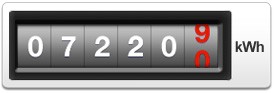
How to read this meter
- Write down all the numbers from left to right, including any zeros.
- Ignore any numbers after the decimal point or which may be shown in red.
Watch our video on How to read a single rate meter.
Single rate 6 digital meter
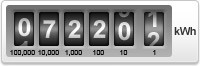
How to read this meter
- Write down all the numbers from left to right, including any zeros.
- Ignore any numbers after the decimal point or which may be shown in red.
Two rate/Economy 7 meter
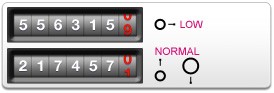
How to read this meter
If you have an Economy 7 meter, you may be charged a lower rate for electricity used in off-peak hours. Read your contract to see if this applies for you, but if it does your meter should have two rows of numbers. The top row (marked 'LOW' or 'NIGHT') shows how many units of off-peak electricity you've used. The bottom row (marked 'NORMAL' or 'DAY') shows how many units of peak electricity you've used. Write down all the numbers from left to right, including any zeros. Ignore any numbers after the decimal point or which may be shown in red.
Watch our video on How to read a two rate dual display meter.
Electronic meter
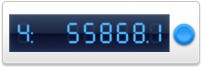
How to read this meter
Your electronic meter may show just one or multiple screens. You'll need to scroll through to find your reading. Different electronic meters go through the information in different orders. Letters or numbers will come up on the display to show which rate the reading is for. For example:
- R1 or R2
- 1 or 2
- L or N
- Low or Normal
For all electronic meters:
- Ignore the red button
- Press the blue button to change the screen display to show what you want
- Write down all the numbers from left to right, including any zeros. Ignore any numbers after the decimal point or which may be shown in red
Dial meter
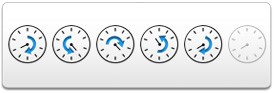
How to read this meter
- Each dial turns in the opposite direction to the one before it, so check which way each turns
- Read the five dials from left to right, ignoring the dial marked 1/10
- Write down the number that the pointer has just passed it must be the lower of the two numbers either side of the pointer. If the pointer is between 9 and 0, write down 9
- If the pointer is exactly on a number and the following dial reads '9', you need to take one away from the number
Watch our video on How to read a dial meter
Wattless meter
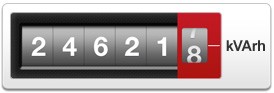
How to read this meter
A wattless meter differs from a normal single rate meter in that it records in units kVArh. Write down all the numbers from left to right, including any zeros. Ignore any numbers after the decimal point or which may be shown in red.
Mk7B electricity meter
The Mk7B electricity meter is a traditional business meter that records how much electricity you use, helping ensure your bills are accurate. It’s easy to read once you know where to look, with clear numbered dials showing your total usage.
- This button is sealed and can only be used by your smart meter engineer
- Use this button to see the date, time and your current meter readings
- This optical port is used by your smart meter engineer
- This is the serial number of your smart meter. You'll see it on all your bills too
- The pulsing lights show how much energy you're using
- The arrow on your screen shows your current usage rate
- This tells you the make and model of your smart meter
Mk7C electricity meter
The Mk7C electricity meter is a digital business meter that shows your electricity usage on a clear screen. It’s straightforward to read and helps ensure your bills are based on accurate, up‑to‑date readings.
- This button is sealed and can only be used by your smart meter engineer
- Use this button to see the date, time and your current meter readings
- This optical port is used by your smart meter engineer
- This is the serial number of your smart meter. You'll see it on all your bills too
- The pulsing lights show how much energy you're using
- The arrow on your screen shows your current usage rate
- This tells you the make and model of your smart meter
Mk10A electricity meter
The Mk10A electricity meter is a modern digital meter commonly used by businesses to record electricity usage accurately. Its clear display makes readings easy to take and helps ensure your bills reflect your actual energy use.
- This button is sealed and can only be used by your smart meter engineer
- Use this button to see the date, time and your current meter readings
- This optical port is used by your smart meter engineer
- This is the serial number of your smart meter. You'll see it on all your bills too
- The pulsing lights show how much energy you're using
- The arrow on your screen shows your current usage rate
- This tells you the make and model of your smart meter
SMETS 2 electricity meter
The SMETS 2 electricity meter is a smart meter that automatically records and sends your electricity usage to your supplier. It provides accurate billing without manual readings and gives businesses better visibility of their energy use.
- Button A is used to manually scroll through custom display items
- Button B can only be used by your smart meter engineer
- This is the serial number of your smart meter you'll see it on all your bills too
- This tells you the make and model of your smart meter
- LED flashes when power is going through the meter, the more power passing the faster the LED flashes
Making the installation process clear and easy
We've signed up to the Consolidated Metering Code of Practice (CoMCoP), which means we're committed to making the installation process clear and easy for our customers.
How to read your business gas meter
Our visual guides for different types of meters
Use our visual guide to understand your gas meter and take a clear, accurate meter reading in just a few steps.
Business electricity meters
Gas digital imperial meter
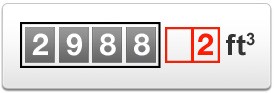
How to read this meter
Write down all the numbers from left to right, including any zeros. Ignore any numbers after the decimal point or which may be shown in red.
Watch our video on How to read a single rate meter.
5-digit electronic meter
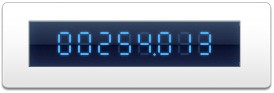
How to read this meter
Write down all the numbers from left to right, including any zeros. Ignore any numbers after the decimal point or which may be shown in red.
Gas digital metric meter
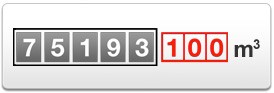
How to read this meter
Write down all the numbers from left to right, including any zeros. Ignore any numbers after the decimal point or which may be shown in red.
Watch our video on How to read a two rate dual display meter.
Dial meter
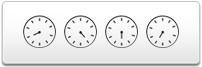
How to read this meter
- Each dial turns in the opposite direction to the one before it, so check which way each turns
- Read the four dials from left to right along the bottom row only ignore any others
- Write down the number closest to each pointer
- When the pointer is between two numbers, write down the lower number. If the pointer is between 9 and 0, write down 9
- If the pointer is exactly on a number and the following dial reads '9', you need to take one away from the number
BK-G10E gas meter
When we have your monthly meter readings sent automatically, we can make sure your bills are more accurate and potentially help you make energy savings.
- This is the serial number of your smart meter. You'll see it on all your bills too
- This optical port is used by your smart meter engineer
- Use these buttons to see the date, time and your current meter readings
- This tells you the make and model of your smart meter
Data logger devices
An alternative to a business gas smart meter is to have a data logger device fitted to your existing gas meter.
Data loggers work in the same way as a smart meter by using mobile phone technology to send suppliers your readings remotely.
Key benefits of a data logger:
- Automatic meter readings sent remotely
- More accurate billing based on real usage
- No need to replace your existing gas meter
- Suitable for many business premises
Submit your meter reading
Submit regular meter readings to help keep your bills accurate. If you have a working smart meter, we’ll receive your readings automatically - no action needed.
How to read a smart meter
Smart meters automatically send your meter readings to us, so you don’t usually need to submit them manually, however, if you want to check your smart meter reading:
- Press the display button on your meter
- Scroll through the screens until you see your reading
- Note the numbers shown (ignore decimals if displayed)
Checking your smart meter readings regularly can help you better understand your energy usage and how your business is consuming energy over time.


